Showing posts with label picmonkey. Show all posts
Season's Greetings
XO, dear Upcycled Education friends + family.
Have a superb holiday season (if you celebrate) and whose ready to have some brave fun in 2019?!
(Me, me!)
Lots o' love,
Jen
Having too much fun with PicMonkey
Y'all know how much I adore PicMonkey. It is probably the only web-based tool I blog about consistently.
How funny is this clone below?
Now, you see the people skiing around us....
Now, you don't!
How funny is this clone below?
Now, you see the people skiing around us....
Now, you don't!
And, yes that is really what the scenery looks like.
I have a history of cloning photos like here and here. It is just too much fun! If you want to learn how to clone, visit PicMonkey's blog post here with full video tutorial.
Plus, I'm certain there will be something annoying you'll want to clone out of your holiday photos.
Looking out for you,
Jen
PicMonkey, Masking, Double Exposure, and Graduation - Boom!
I had so much fun making the text graphic above using PicMonkey's masking tutorial here to celebrate our 100 ebook giveaway. Seriously, it couldn't be easier to make text more exciting using PicMonkey's ideas to mask - which, by the way, was a totally new skill for me!
Although, I am a HUGE fan of their cloning feature (remember when I cloned out the signs on the highway in Colorado here? Or the time I cloned out Jedi's leash here when he was dressed up as Super Dog?), well, both of those were fun (and easy!) and so is masking.
Oh, and here's another new skill I learned from the PicMonkey blog, double exposure. Don't you love the mountains double exposed on our Hello, Question Cards?
(Shhhhh....don't tell her I ombre-ed her hair with mountains. You know those tweens. They can be finicky about this kind of stuff.) Am I right or am I right?
Go to PicMonkey to play around and use their blog to broaden your skills.
All the best, superstar blog reader,
Jen
PS - If you haven't shared our graduation ebook giveaway yet with your favorite graduate, go here for details!
How we designed the logo for Hello, Strategies
Jackie and I needed a logo for all of our new products and ebook at Hello, Strategies. So, I used what I always use to DIY my own graphics because I think I am a faux graphic designer (what for it...): PicMonkey!
I've blogged about my love for PicMonkey for years now - like my favorite fonts on PM, how to prepare photos for engineering prints, and my favorite, cloning out stuff you don't want in photos. I love PicMonkey so much that each year when my $25 paid subscription runs out, I email PM and kindly ask, since I blog so much about PM, would you be willing to offer me a free paid subscription? They have said yes twice now.
You can, by the way, use PM for free. I just like the paid subscription because then I can have access to all of the premium fonts and features.
It was a no-brainer for me, Jackie, and the Hello, Strategies logo. Use PicMonkey!
So, I did. Plus, I used two of my favorite fonts: Amatic Small Caps and Thirsty Script Bold. I could have a love affair with either or both of those fonts.
I also used PicMonkey to layout the colorful card fronts for both decks of cards. I love that the color palette on PM seems endless for designing and yet, I can be so specific about color choice.
I also created the artwork for our thank you postcard on PM. When you purchase one or more decks of cards or a wooden nickel bundle, you'll receive this fun postcard-sized artwork to hang on your bulletin board, fridge or computer. I don't want to give it all away, but there is a message from Jackie and I on the other side of this postcard.
Just when you think I can't make one more thing on PM, voila, all of the website graphics for Hello, Strategies were made on PicMonkey! Yep. Every. single. one. of. them. PicMonkey is that versatile.
Do I sound like a PicMonkey cult member? Yes. Do I think PicMonkey is easier to use than Photoshop, yet just as awesome for my needs? Absolutely. Do I think I will continue to use PicMonkey and evangelize it? Why, sure! That is, if you don't mind hearing more about my PM creations. Ha!
PicMonkey addicted, for sure,
Jen
I've blogged about my love for PicMonkey for years now - like my favorite fonts on PM, how to prepare photos for engineering prints, and my favorite, cloning out stuff you don't want in photos. I love PicMonkey so much that each year when my $25 paid subscription runs out, I email PM and kindly ask, since I blog so much about PM, would you be willing to offer me a free paid subscription? They have said yes twice now.
You can, by the way, use PM for free. I just like the paid subscription because then I can have access to all of the premium fonts and features.
It was a no-brainer for me, Jackie, and the Hello, Strategies logo. Use PicMonkey!
So, I did. Plus, I used two of my favorite fonts: Amatic Small Caps and Thirsty Script Bold. I could have a love affair with either or both of those fonts.
I also used PicMonkey to layout the colorful card fronts for both decks of cards. I love that the color palette on PM seems endless for designing and yet, I can be so specific about color choice.
I also created the artwork for our thank you postcard on PM. When you purchase one or more decks of cards or a wooden nickel bundle, you'll receive this fun postcard-sized artwork to hang on your bulletin board, fridge or computer. I don't want to give it all away, but there is a message from Jackie and I on the other side of this postcard.
Just when you think I can't make one more thing on PM, voila, all of the website graphics for Hello, Strategies were made on PicMonkey! Yep. Every. single. one. of. them. PicMonkey is that versatile.
Do I sound like a PicMonkey cult member? Yes. Do I think PicMonkey is easier to use than Photoshop, yet just as awesome for my needs? Absolutely. Do I think I will continue to use PicMonkey and evangelize it? Why, sure! That is, if you don't mind hearing more about my PM creations. Ha!
PicMonkey addicted, for sure,
Jen
More PicMonkey Love + Jedi
As you know, PicMonkey and I have a love affair going on for about 2-3 years now. Since I use their Royale product often, blog about it, and they are a cycling team sponsor, they are kind and gift me a yearly subscription to PicMonkey (the Royale upgrade). You can use the regular PicMonkey for free, but I like all the fonts and effects that come packaged in the Royale upgrade (which costs a mere $33/year).
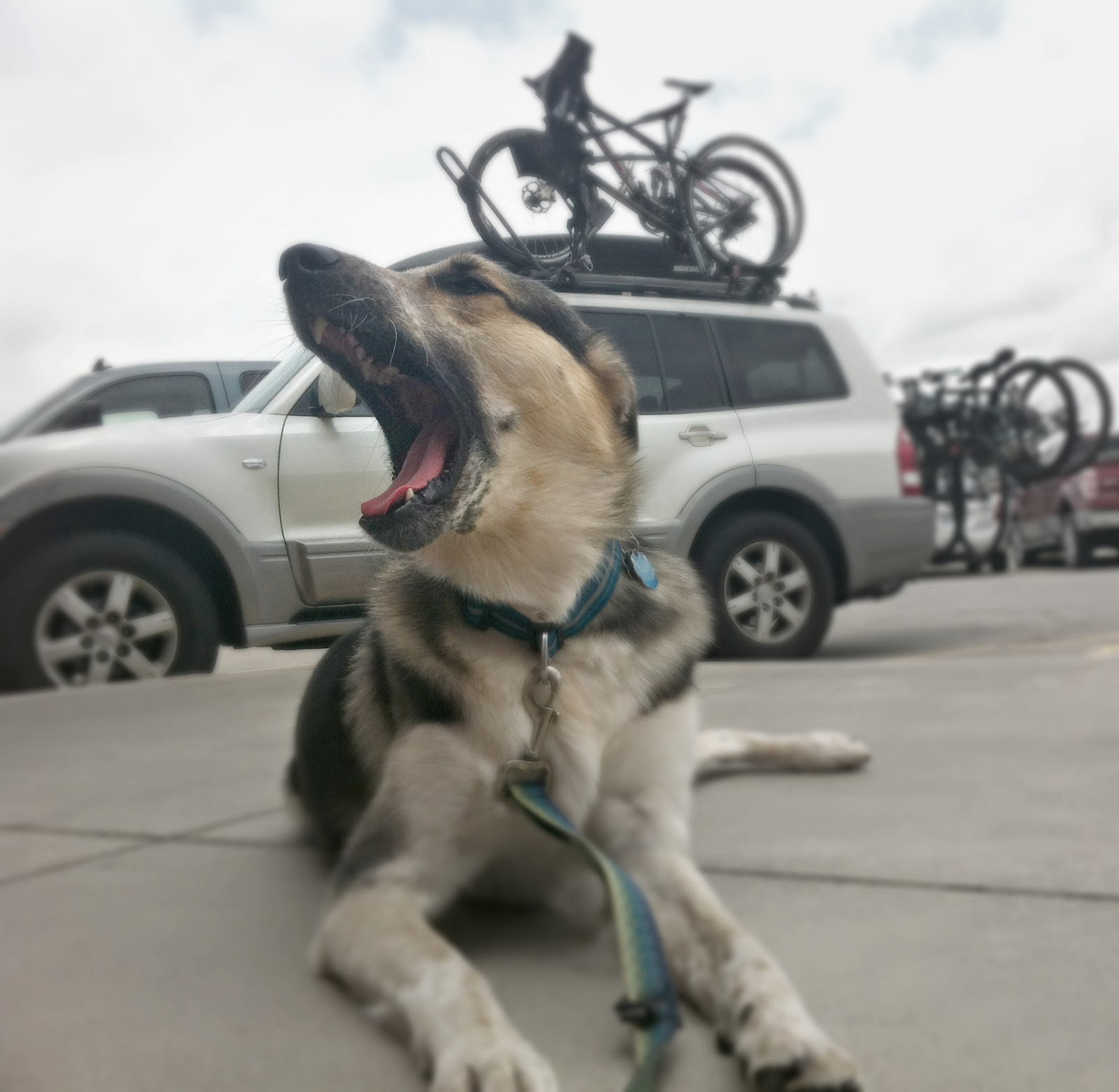
On our roadtrip out to Colorado, Mr. UpCyclist took this photo of Jedi at one of our stops. I love how this photo tells a bit of our roadtrip story. In it, Jedi is yawning outside of Freddy's in Hayes, Kansas, which was a great, local place to pick up burgers, fries and milkshakes. Though, I like the photo and the story behind it, I don't like the wet spot, french fry, dog bowl and extra space on the right side of the photo. All those things "have" to go, in my opinion. Plus, the photo is a bit dark. See?
So, I cropped the photo, cloned out the wet spot & fry and lightened it up with PicMonkey's awesome effects. If you don't know how to clone, see my post about cloning here. It really is so easy, plus you feel like a graphic designer superstar when you clone.
Here is one version of the cloned Jedi photo. I used the Lomo effect for the photo below. I love how the texture of his hair is emphasized in this photo and the color now pops. Notice the wet spot and fry are gone from cloning!
I also tried the Fancy Focus effect to really concentrate on his face & neck (my favorite body parts of his) and make the photo less color saturated. See how his legs and the bikes/car are slightly out of focus and blurred?
This next one was created with the Film Stock effect. It probably is the most natural of the effects I used. No blurring, no color saturation.....
I wanted to see Jedi in black and white, so I used the Focal Black and White effect. Notice how you can still see his pink tongue. Cutie pie with a pink tongue....
To achieve a more artsy look, I used the Posterize effect below. This one reminds me of a Warhol piece.
And lastly, I thought a touch of sun would be fun on sweet Jedi, so I used the Sunglow effect. It looks like he is yawning towards the sun (even though it was super overcast that day). I wish I would have lessoned the orange tint in this photo, oh well, next time.
From this....
To my favorite one, this....
I heart PicMonkey, all its cool effects and this dog. Oh, I love this dog.
How do you like to use PicMonkey?
xo,
Jen
Cloning {for Tech Tuesday}
Tech Tuesday returns! I have no idea if this post will be helpful in a classroom or not, but it sure is cool.
So, if anything, maybe you can win coolness points with your students, colleagues and/or friends & family. Being cool is cool, right?
Even cooler than cool is cloning. The art of cloning is cool.
Exhibit A: The original photo. It is lovely. Jedi is simply enjoying a normal Sunday morning. The leash, though, has got to go. Super Dogs don't do leashes!
Exhibit B: The leash goes. Say, bye-bye to the leash. Super Dog is happy and leash-free - just as a Super Dog should be.
How did I do it?
Exhibit C: PicMonkey (which I am about to have an affair with. Don't tell Mr. UpCyclist) and this instructional screenshot below. I cloned that leash right out. It took me under 45 seconds to do.
You can, too. Upload a photo you want to clone to PicMonkey (let's say, you broke up with your significant other and you want to clone them out of all your vacation photos, yes?). Now, follow the instructional screenshot below. Or, if you prefer, PicMonkey wrote a cloning tutorial for you. Why didn't I look for that sooner? I could have saved myself a blog post. Guess what? Their tutorial is really, really good - borderline awesome.
So, if you can't follow my instructional screenshot above, go to PicMonkey's cloning tutorial and have a go.
Can we just revisit Super Dog Jedi one more time? I mean, seriously. Could he be any more super or ready for Halloween?
In love,
Jen
So, if anything, maybe you can win coolness points with your students, colleagues and/or friends & family. Being cool is cool, right?
Even cooler than cool is cloning. The art of cloning is cool.
Exhibit A: The original photo. It is lovely. Jedi is simply enjoying a normal Sunday morning. The leash, though, has got to go. Super Dogs don't do leashes!
Exhibit B: The leash goes. Say, bye-bye to the leash. Super Dog is happy and leash-free - just as a Super Dog should be.
How did I do it?
Exhibit C: PicMonkey (which I am about to have an affair with. Don't tell Mr. UpCyclist) and this instructional screenshot below. I cloned that leash right out. It took me under 45 seconds to do.
You can, too. Upload a photo you want to clone to PicMonkey (let's say, you broke up with your significant other and you want to clone them out of all your vacation photos, yes?). Now, follow the instructional screenshot below. Or, if you prefer, PicMonkey wrote a cloning tutorial for you. Why didn't I look for that sooner? I could have saved myself a blog post. Guess what? Their tutorial is really, really good - borderline awesome.
So, if you can't follow my instructional screenshot above, go to PicMonkey's cloning tutorial and have a go.
Can we just revisit Super Dog Jedi one more time? I mean, seriously. Could he be any more super or ready for Halloween?
In love,
Jen
PicMonkey for Halloween {& for Tech Tuesday}
Considering the photo below was once a lovely, sweet mother-daughter shot, shows you how much fun PicMonkey is for Halloween (and pretty much any holiday or regular day of the week).
To get the vampire-zombie-demon-witch effects used above, go to PicMonkey, upload a photo for free, and use the pumpkin icon (bottom left) to access all the Halloween effects. If you hashtag your creations #PicMonkeyBOO, you might even win a year's subscription to PicMonkey's premium features. Click here for details.
Now, to get that blood splat off my arm.....
Jen
Pic Monkey Collages {for Tech Tuesday}
You know I adore PicMonkey as evidenced here and here. Did you know PicMonkey is a cycling team sponsor? Woot!
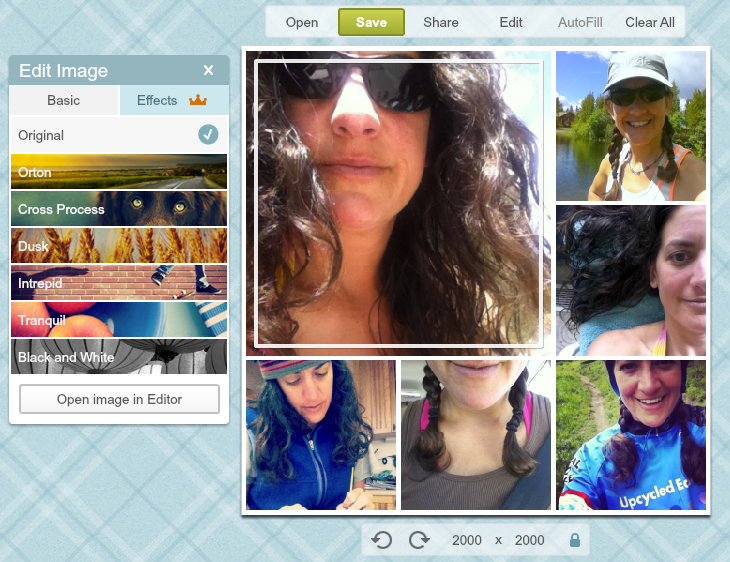
My admiration for PicMonkey just got stronger. Yep, you heard me. Strong-er. Their recent collage update is primo. You can now edit all your photos right in your collage. Then, you can transfer the whole collage to the regular side of PicMonkey and add textures, overlays, doodles, text, the works! I am in love. Pure PicMonkey love.
The updated PicMonkey interface looks like this (photo below). It is easy-peasy to edit each photo now. Yay!
My admiration for PicMonkey just got stronger. Yep, you heard me. Strong-er. Their recent collage update is primo. You can now edit all your photos right in your collage. Then, you can transfer the whole collage to the regular side of PicMonkey and add textures, overlays, doodles, text, the works! I am in love. Pure PicMonkey love.
The updated PicMonkey interface looks like this (photo below). It is easy-peasy to edit each photo now. Yay!
Oh, and if you are wondering why all the selfie shots above and in my Instagram feed. Before you think I've gotten all full of myself, I am taking the A Beautiful Mess 30-Day Selfie Challenge and expanding my phoneography skills (yes, new 21st century word). Quit frankly, I could use some phoneography skills. Have you seen all my blurry iPhone photos the last few weeks? Oh my.
Back to PicMonkey.....
I was exploring all the cool features PicMonkey offers because I had an extra moment. Since I hardly ever play with the textures, I popped those open to see what the textures looked like. I love distressed things. The smudge texture used below would be cool for the right photo or project.
Hey, look - selfies on fabric! This was another interesting texture you can add. This one is called weave. The faux seamstress in me likes this.
Alrighty, my dear friend and blog reader, I must run - the mountains and summertime are calling me. Go play with PicMonkey and send me a link to whatever you create or alter. Then, I will cheer and hoot and celebrate our enduring Pic Monkey love.
xoxo,
Jen
Fish Philosophy {New graphic}
I was having too much fun on Pic Monkey the other day making this graphically reminder. Plus, I sooooo adore the Fish Philosophy. Don't you? If you aren't familiar with it, have a look here. It works fantastically at school, home, and in business.
Cheers,
Jen
Favorite Fonts @ PicMonkey {for Tech Tuesday}
Do I need to say more?
Click here to read the original post about PicMonkey as a lovely {free} alternative to Photoshop.
I just LOVE the new Amatic Small Caps font, don't you?
Dee-lightful,
Jen
PicMonkey {for Tech Tuesday} + Free Download
Since still mourning the loss of Picnik, I have at least embraced PicMonkey. It is almost the same as Picnik - easy to use, lots of cool fonts, neat effects and it's free. I do miss Picnik's ability to connect directly to Facebook and Picasa photos, though. That made photo editing sooooo easy.
With that said, PicMonkey is doing the trick lately as evidence by the faux chalkboard art I created above. If you want to make your own faux chalkboard art, download the chalkboard backgrounds here. Then, upload your favorite background into PicMonkey. To make the chalkboard art, I chose fonts that looked semi-chalkboard-ish and then faded them about 25% and blended them using the "difference" option. You can see those features in the PicMonkey screenshot below.
PicMonkey is also easy-to-use for photo-editing, in case you want to embrace it for what is was most likely intended for. Also, if you'd like a free download of the art I created above, click here and enjoy. I think the art would look snazzy framed or on a bulletin board in your classroom. Plus, I love that quote by Sue Monk Kidd. My dreams are definitely lined up in a queue.
Onward, you photo-editing-art-creating-amazing-blog-reader,
Jen
PS - Special thanks to Kellie at Nest of Posies for the post that inspired this new pastime.
Subscribe to:
Posts (Atom)